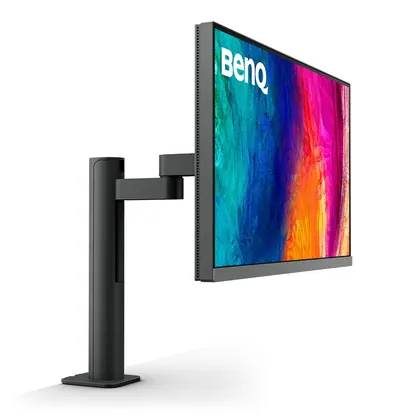
BenQ
BenQ PD2706UA
$499
Released 2023-04
Best Computer Monitors · head-to-head
A sourced, side-by-side comparison. Gigabyte M27Q is cheaper at $349.99. Every spec and price links to its source.
BenQ
$499
Released 2023-04
Gigabyte
$349.99Cheaper
Released 2021-03
The Gigabyte M27Q wins 2 of the 2 specs we compare head to head; the other wins 0. The Gigabyte M27Q is the cheaper at $349.99. The Gigabyte M27Q both leads on specs and costs less — the straightforward pick.
As an Amazon Associate we earn from qualifying purchases. Prices verified at capture; live price may differ.
The numbers that decide it, drawn to scale — longer bar wins, the accent bar is the stronger figure.
✓ marks the stronger figure where "more" — or "less", for price and weight — is unambiguously better.
| Spec |  BenQ PD2706UA BenQ PD2706UA | Gigabyte M27Q |
|---|---|---|
| US price | $499 | $349.99 |
| Brand | BenQ | Gigabyte |
| Released | 2023-04 | 2021-03 |
| Size (in) | 27 | 27 |
| Resolution | 3840x2160 | 2560x1440 |
| Panel type | IPS | IPS |
| Refresh (Hz) | 60 | 170 |
| Response (ms) | 5 | 0.5 |
| HDR | VESA DisplayHDR 400 | VESA DisplayHDR 400 |
| Ports | 1x DP 1.4, 2x HDMI 2.0, 1x USB-C (90W PD, DP Alt), 3x USB-A 3.2 | 1x DP 1.2, 2x HDMI 2.0, 2x USB-A 3.0, 1x USB-C (DP Alt) |
| Adaptive sync | None | AMD FreeSync Premium |
| Release | 2023-04 | 2021-03 |
Sources — BenQ PD2706UA: benq.com (verified 2026-06-15). Gigabyte M27Q: gigabyte.com (verified 2026-06-15).
Where the two actually differ on the specs we track (5 of 8). Matching specs are omitted.
Sourced tester consensus for each — the "what people who used it think" layer, not just specs.
Two whitelisted testers bench-tested this exact BenQ PD2706UA: Tom's Hardware (7 June 2023) and TechRadar (7 July 2023). Both rate it a near-flawless professional 27-inch 4K display with strong value, praising the included ergonomic C-Clamp arm and the Hotkey Puck. TechRadar measured an average Delta E of 1.12 with 96% P3 / 100% sRGB / 89% Adobe RGB coverage; Tom's Hardware confirmed over 95% DCI-P3 coverage out of the box. Both flag 60Hz-only refresh with no Adaptive-Sync; TechRadar also flags weak built-in speakers. Non-whitelist blogs excluded. (2 sourced reviews, 2 lab-tested.)
Praised: Excellent out-of-box color accuracy and wide gamut coverage for professional creative work; Strong price-to-performance value for a professional-grade display; Premium ergonomic included monitor arm / C-Clamp stand with tidy cable management.
Flagged: 60Hz refresh with no Adaptive-Sync — not suited to fast gaming; Thin-sounding, unimpressive built-in speakers; Backlight/field dimming to boost contrast works only in HDR, not SDR.
Only one whitelisted lab review qualified: Tom's Hardware. It rates the M27Q a fast, high-value 170 Hz QHD IPS monitor with measured >400 nits brightness, 1,118.9:1 contrast, and an exceptionally low 22 ms input lag. Downsides: lackluster HDR and Aim Stabilizer ghosting. (1 sourced review, 1 lab-tested.)
Praised: Very low input lag (22 ms measured) and fast 170 Hz gaming performance; Strong value for the price; Large color gamut (over 100% DCI-P3) with accurate sRGB mode.
Flagged: Aim Stabilizer blur-reduction introduces significant ghosting; Lackluster HDR with no extra contrast in HDR mode; DCI-P3 red is slightly under-saturated.