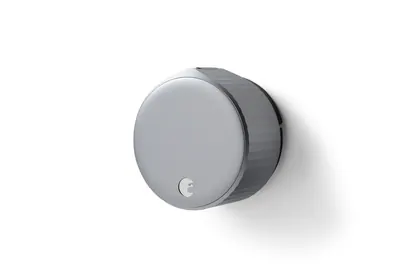
August
August Wi-Fi Smart Lock (4th Gen)
$199.99Cheaper
Released 2021
Best Smart Locks · head-to-head
A sourced, side-by-side comparison. August Wi-Fi Smart Lock (4th Gen) is cheaper at $199.99. Every spec and price links to its source.
August
$199.99Cheaper
Released 2021
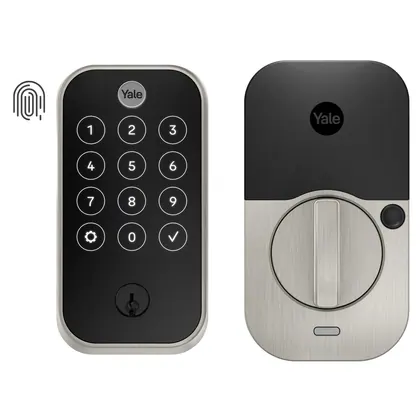
Yale
$239.99
Released 2022
On the specs we track, they're closely matched. The August Wi-Fi Smart Lock (4th Gen) is the cheaper at $199.99.
As an Amazon Associate we earn from qualifying purchases. Prices verified at capture; live price may differ.
✓ marks the stronger figure where "more" — or "less", for price and weight — is unambiguously better.
| Spec |  August Wi-Fi Smart Lock (4th Gen) August Wi-Fi Smart Lock (4th Gen) |  Yale Assure Lock 2 Yale Assure Lock 2 |
|---|---|---|
| US price | $199.99 | $239.99 |
| Brand | August | Yale |
| Released | 2021 | 2022 |
| Unlock methods | smartphone app, Apple Watch, voice assistant (Alexa/Google/Siri), auto-unlock, physical key (existing deadbolt retained) | touchscreen keypad, smartphone app, Apple Home Key (NFC tap on iPhone/Apple Watch), physical key (on keyed models), voice assistant (Alexa/Google) |
| Connectivity | Wi-Fi 802.11 b/g/n 2.4GHz/5GHz built-in, Bluetooth LE | Wi-Fi built-in (premium SKU), Bluetooth, Z-Wave Plus module (optional, $80 add-on) |
| Matter | No | No |
| Auto lock | Yes | Yes |
| Battery type | 2× CR123 | 4× AA (9V terminal for emergency backup) |
| Finish options | Silver, Matte Black | Matte Black, Satin Nickel, Bronze |
| Install type | Retrofit interior — mounts over existing single-cylinder deadbolt, no drilling | Replaces existing deadbolt — single-bore door |
| Release | 2021 | 2022 |
Sources — August Wi-Fi Smart Lock (4th Gen): august.com (verified 2026-06-15). Yale Assure Lock 2: shopyalehome.com (cited since 2026-09-28; read 2026-06-15 at digitaltrends.com).
Where the two actually differ on the specs we track (5 of 7). Matching specs are omitted.
Sourced tester consensus for each — the "what people who used it think" layer, not just specs.
Two whitelisted hands-on reviews (Engadget, Tom's Guide) cover this exact 4th-gen August Wi-Fi Smart Lock; both recommend it for an easy, tool-light install, a smaller hidden design, built-in Wi-Fi and broad smart-home support. Neither published lab benchmarks, so there are no measured numbers. Main gripes: unreliable Android auto-unlock (Engadget) and a keypad sold separately for $59.99 (Tom's Guide). (2 sourced reviews.)
Praised: Fast, tool-light install that keeps the original keyway and physical keys; Smaller, discreet design that hides on the inside of the door; Wi-Fi built in, so no separate bridge is needed for remote lock/unlock.
Flagged: Auto-unlock is finicky and unreliable, especially on Android; Keypad is not included and costs extra ($59.99); Dropped Z-Wave, so power users lose offline local control.
Four whitelisted testers (Engadget, TechRadar, Tom's Guide, TechHive) hands-on-tested the Yale Assure Lock 2 (across keypad/touchscreen and Wi-Fi configurations) and all recommend it as a good-looking, reliable smart deadbolt with broad smart-home support. The most common gripes are the dated, buggy Yale Access app (TechRadar, TechHive) and an installation that can need careful attention (TechRadar, Engadget). Tom's Guide separately dinged the lack of fingerprint or tap-to-unlock. Consumer Reports and retailer reviews were excluded. (4 sourced reviews, 4 lab-tested.)
Praised: Attractive, compact design (about 30% smaller inside than the original); Reliable everyday locking and unlocking in testing; Broad smart-home support (Alexa, Google, HomeKit, plus Wi-Fi/Z-Wave/Matter modules).
Flagged: Dated, buggy Yale Access app (crashes, no battery indicator); Installation can need careful attention (~30 min, occasional troubleshooting); No fingerprint or tap-to-unlock; must press Yale logo first to use the pad.